Infrastructure
Zotero WebDAV Server
Author: Nara Avila | Published 25 Oct 2026



Sync your Zotero library across desktop and mobile for ~$0.60/month
We are building a self-hosted serverless storage service analogous to Zotero Cloud / Zotero Storage (which costs around $10/month on the unlimited tier) — for roughly $0.60 USD/month. Built with Terraform, Cloudflare Workers and AWS (API Gateway, Lambda in Go and private S3) on a practically free compute tier, Zotero WebDAV Server stores and synchronizes up to 100 GB of PDF attachments and library archives across computers and mobile devices with zero idle server costs.
https://webdav.zotero.workers.dev/zotero/).~$0.60/mo vs. $10/mo
Replaces a $10/month Zotero Cloud subscription for large libraries. Cloudflare Workers, API Gateway and Lambda run inside practically free tiers; you only pay low-cost S3 storage (~$0.60/month for 100 GB).
Desktop & Mobile Sync
Works natively with the standard WebDAV client inside Zotero Desktop (macOS, Windows, Linux) as well as Zotero on iOS, iPadOS and Android.
Private S3 + Presigned URLs
The S3 bucket stays strictly private with TLS enforcement and AES-256 encryption. Lambda validates HTTP Basic Auth and signs short-lived SigV4 URLs.
How the AWS + Cloudflare hybrid infrastructure works
Standard serverless gateways impose tight payload limits on incoming HTTP bodies (10 MB on API Gateway and 6 MB on synchronous Lambda invocations), which breaks large Zotero attachment uploads while keeping a dedicated EC2 or container running 24/7 would cost $15–$35/month. This project combines Cloudflare Workers at the edge with AWS Lambda + S3 in a single Terraform state to stay practically free:
- Zotero Client
- Cloudflare Worker
- API Gateway + Go Lambda
- Private Amazon S3
- Lightweight DAV operations (
OPTIONS,PROPFIND,MKCOL,HEAD,DELETE): The Cloudflare Worker forwards metadata requests to API Gateway and the Go Lambda (`arm64` on `provided.al2023`), which translates S3 prefixes and objects underzotero/into WebDAV XML responses. - Large attachment uploads (
PUT): Instead of sending the binary ZIP through API Gateway or Lambda, the Worker sends only the file metadata (path, content type and size) plus an internal bridge token to Lambda's/_worker/uploadendpoint. Lambda authenticates the user, generates a 120-second presigned S3PutObjectURL, and the Worker streams the upload directly to S3 viaFixedLengthStream(or issues a307 Temporary Redirect). - Direct downloads (
GET): Lambda verifies the object and returns a307 Temporary Redirectwith a presigned S3GetObjectURL, allowing Zotero on computers and mobile devices to download the attachment archive directly from S3.
What you need before deploying
To provision and run your own instance of zotero-webdav-server, you need three accounts:
1. AWS Account
Provides the private S3 storage bucket, the HTTP API Gateway, the Go Lambda handler, CloudWatch logs and the IAM OIDC role for GitHub Actions deployments.
2. Cloudflare Account
Hosts the edge Worker on your free *.workers.dev subdomain (no custom domain purchase required). You will need your Account ID and an API Token with Workers Scripts: Edit permission.
3. Terraform Cloud (HCP) Account
Manages the unified infrastructure state (workspace zotero-webdav-server) and securely stores the sensitive variables shared between AWS and Cloudflare.
Define the required variables
Configure the following variables in your Terraform workspace (or terraform.tfvars) and execution environment so Terraform can wire the Cloudflare Worker, API Gateway, Lambda and S3 together automatically:
Required Credentials & Account Variables
| Variable | Type / Scope | Description |
|---|---|---|
webdav_username |
Terraform (sensitive) |
HTTP Basic Auth username that you will enter inside Zotero's sync settings. |
webdav_password |
Terraform (sensitive) |
HTTP Basic Auth password for Zotero (minimum 5 characters; use a strong secret). |
webdav_worker_token |
Terraform (sensitive) |
Shared internal secret (at least 32 random characters) used to authenticate requests between the Cloudflare Worker and the Lambda bridge (X-WebDAV-Worker-Token). |
cloudflare_account_id |
Terraform (string) |
Your Cloudflare Account ID where the Worker script will be published. |
cloudflare_api_token / CLOUDFLARE_API_TOKEN |
Terraform or Environment (sensitive) |
Cloudflare API Token scoped to your account with Workers Scripts: Edit permission. |
AWS_ACCESS_KEY_ID & AWS_SECRET_ACCESS_KEY |
Environment / OIDC | AWS credentials (or dynamic OIDC role credentials in Terraform Cloud) authorized to provision S3, Lambda, API Gateway, IAM and CloudWatch resources. |
Optional Tuning Variables (with defaults in infra/_variables.tf)
| Variable | Default | What it controls |
|---|---|---|
cloudflare_workers_subdomain |
"zotero" |
Your existing Cloudflare account workers.dev subdomain (without .workers.dev). |
cloudflare_worker_name |
"webdav" |
Name of the deployed Cloudflare Worker script. |
cloudflare_upload_mode |
"stream" |
Upload path: stream (Worker streams PUT to S3 via FixedLengthStream) or redirect (307 redirect to S3). |
cloudflare_max_upload_bytes |
100000000 |
Application upload size cap in bytes (100 MB default matching Cloudflare Free/Pro ingress limit). |
project_name |
"zotero-webdav-server" |
Base naming prefix for AWS resources. |
env |
"prod" |
Deployment environment suffix (prod sets Lambda log level to INFO). |
aws_region |
"us-east-2" |
AWS region for the S3 bucket, API Gateway and Lambda function. |
presigned_get_expiration_seconds |
300 |
Lifetime in seconds (60–3600) for presigned S3 download URLs. |
presigned_put_expiration_seconds |
120 |
Lifetime in seconds (60–300) for short-lived presigned S3 upload URLs. |
lambda_memory_size / lambda_timeout_seconds |
128 / 15 |
Memory (MB) and execution timeout (seconds) for the ARM64 Go Lambda handler. |
api_throttling_rate_limit / api_throttling_burst_limit |
20 / 50 |
Sustained requests/second and burst limit on API Gateway. |
Example: generating webdav_worker_token and setting variables
Generate a 32+ character random token locally and register the required values in your Terraform workspace (never commit secrets to Git):
# Generate a 64-character hex secret for webdav_worker_token
openssl rand -hex 32

# Example terraform.tfvars (keep local / set in Terraform Cloud UI)
webdav_username              = "nara"
webdav_password              = "your-strong-zotero-password"
webdav_worker_token          = "paste-your-64-char-random-hex-token-here"
cloudflare_account_id        = "your-cloudflare-account-id"
cloudflare_workers_subdomain = "your-subdomain"Build the Go handler and apply Terraform
In infra/_main.tf, update the cloud block with your Terraform Cloud organization and workspace name. Build the ARM64 Go binary for the initial Lambda package, then initialize and apply the Terraform configuration:
# 1. Run tests for the Worker and Go WebDAV handler
node --test worker/worker.test.mjs
cd infra/handler_webdav && go test ./...

# 2. Build the initial ARM64 Lambda bootstrap binary
GOOS=linux GOARCH=arm64 CGO_ENABLED=0 \
  go build -trimpath -ldflags="-s -w" -o bootstrap .

# 3. Provision AWS + Cloudflare infrastructure via Terraform
cd ..
terraform init
terraform validate
terraform apply
When the apply finishes, Terraform outputs zotero_worker_base_url (for example, https://webdav.your-subdomain.workers.dev) and aws_lambda_github_role_arn. If you use the included GitHub Actions workflow (.github/workflows/deploy-lambda-function.yml) for continuous Lambda code updates, save that IAM role ARN as the repository secret AWS_LAMBDA_ROLE_TO_ASSUME_PROD.
Connect Zotero on computers and mobile devices
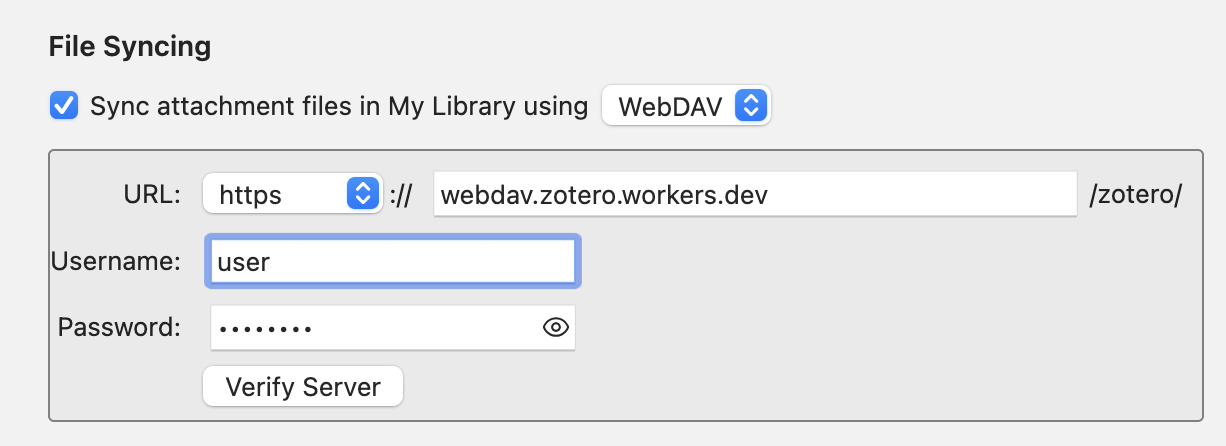
Open Zotero on your desktop computer or mobile device (iOS, iPadOS or Android) and go to Settings → Sync → File Syncing:
- Set Sync attachment files in My Library using to WebDAV.
- Select https and enter the host/path from
zotero_worker_base_url(without the trailing/zotero/, as Zotero appends/zotero/automatically). - Enter your
webdav_usernameandwebdav_password. - Click Verify Server. Zotero performs an
OPTIONScheck, aPROPFINDlookup, and creates/deleteszotero-test-file.propto confirm full read/write access.
This page was last updated at 2026-11-03 16:10.